
When the network is slow, the first question is which part is slow. Is the campus network or campus VPN up, how does the education network look, how fast is the proxy or public exit? pace measures each of these separately and reports each on its own.
pace 0.5.0 is an open-source MIT command line for macOS, Linux and Windows. The terminal view and --json output come from the same results.
Why not a speed-test website
A typical speed-test site picks the ISP server closest to you, measures the best-looking stretch of the path, and hands you one number. On an education network the trouble is usually elsewhere. A campus service is unreachable, the VPN dropped, the CERNET exit is congested, or the proxy exit is slow. pace runs every selected target in order and lists the results side by side. It never substitutes, ranks or folds them into one score.
Project snapshot
Nanjing University’s on-campus test uses speed.nju.edu.cn. When a site cannot be reached, pace reports that as it is and does not swap in another site.
6
Vantage points: NJU campus, Tongji, CERNET, M-Lab, Apple, Ookla
0
Overall scores · telemetry
4
Stable exit codes: 0 1 2 130
0.5.0
Current release · MIT
Campus, education network and proxy exit in one run
1/3
pace opens the interactive view, and the first run asks which targets to test day to day. nju-campus measures the NJU campus network or campus VPN with three concurrent streams, IPv4 and IPv6 separately if you like. tongji is an education-network reference toward Shanghai and the Yangtze delta. mlab measures M-Lab from the current public exit, so with a proxy on, that exit is the proxy. Targets run one after another so they do not compete for bandwidth.
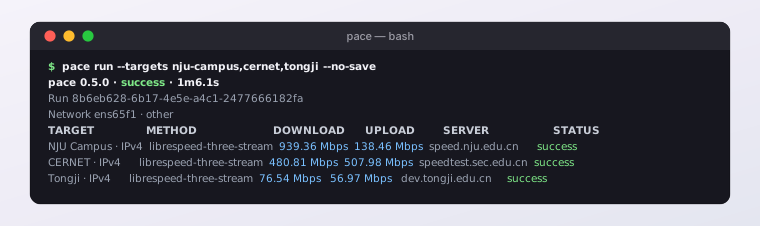
A real run on the NJU campus wired network, 2026-10-04: campus, the CERNET backbone and a cross-province education link each get their own numbers.
A failure is recorded as a failure
2/3
A failed measurement records zero throughput and the stage where it stopped (dns, connect, download, timeout…). After Ctrl-C, targets that had not started are marked skipped. Every run is saved locally as JSON. pace history reads it back, pace export writes JSONL or CSV, and --json gives scripts and scheduled jobs something to parse.
Privacy is your decision
3/3
M-Lab publishes test results and your public IP and keeps them indefinitely, so pace measures M-Lab only after you run pace consent accept; without that record the run fails before contacting M-Lab. pace itself uploads nothing and does no geolocation, and it does not accept Apple’s or Ookla’s terms for you. Ookla runs only through the official Speedtest CLI you install yourself.