
Connect to the NJU campus VPN and keep the system network as it was: the only thing a connection adds is a local SOCKS5 port, 127.0.0.1:1081. Point an app at it when that app needs the campus network.
nju-connect 1.2.0 is open source under AGPL-3.0-or-later and speaks both EasyConnect and aTrust gateways. macOS gets a menu bar app and a command line; Linux and Windows get the command line.
Why not the official client
Sangfor’s EasyConnect and aTrust clients take over the whole machine once connected: they rewrite the routing table and DNS and leave a service running in the background. Every connection on the machine follows the VPN, which tends to collide with proxies, Tailscale and Docker networks. nju-connect does the opposite: it opens one stable SOCKS5 port on the loopback address, never touches routes, DNS or the firewall, and is gone when it exits.
Project snapshot
Not affiliated with Nanjing University or Sangfor. The macOS app is ad-hoc signed and not notarized by Apple.
SOCKS5
One port: 127.0.0.1:1081
0
Route changes · DNS changes · system services
2
Gateways: EasyConnect and aTrust
1.2.0
Current release · AGPL-3.0
Only the traffic you choose goes to campus
1/3
Whichever browser, terminal or download tool needs the library databases or a campus service gets 127.0.0.1:1081; everything else stays direct, and existing proxies and overlay networks are unaffected. The menu bar shows connection state and live traffic, and runs a campus speed test in one click.
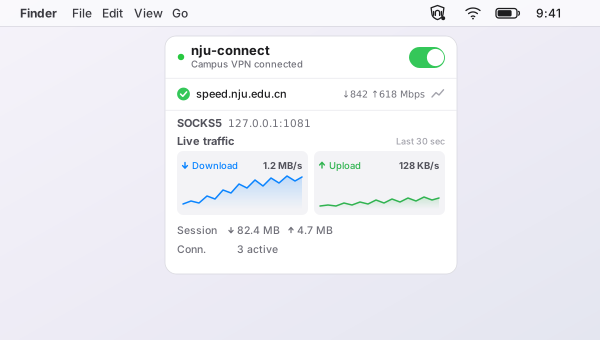
The menu bar app: connect switch, SOCKS5 endpoint, speed.nju.edu.cn campus speed test and live traffic.
The command line and the menu bar are one program
2/3
nju-connect setup walks through gateway, account and password; nju-connect connect connects, and EasyConnect can move to the background with --background. status --json gives scripts stable machine-readable output, and speedtest campus measures the campus link directly. The menu bar app calls this same command line; there is no second implementation.
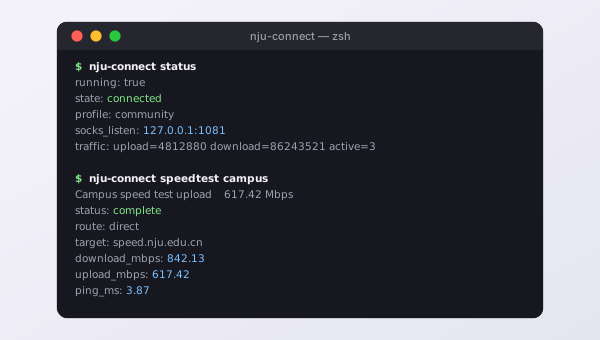
nju-connect status and nju-connect speedtest campus.
Passwords and sessions stay on the machine
3/3
The long-term password and the aTrust session live in owner-only (0600) files in the config directory, never in command-line arguments, environment variables or logs; an SMS code is used for that one login only. Status queries go over a local socket only you can reach, and output is redacted before it is shown.