
Running many accounts means giving each one its own computer. facet builds on the open-source fingerprint-chromium engine. It stores the fingerprint seed, platform, proxy, time zone and language as a profile that you create, open and close from a terminal interface, and no profile sees another’s cookies or logins.
facet 0.1.0 is a free, MIT-licensed tool for macOS and Linux, on Intel and ARM. No sign-up and no subscription.
Why facet
Commercial fingerprint browsers charge a monthly fee per profile and keep your accounts and settings in their cloud. fingerprint-chromium is a free, open-source engine, but its fingerprint is set entirely by launch flags, typed by hand every time, and you have to remember which seed went with which account. facet is the layer in between. Settings are local TOML files, proxy passwords go into the system keychain, and it is one binary that sends nothing anywhere.
Project snapshot
facet does not ship the browser engine. Install fingerprint-chromium 142 or later from its Releases first. A fingerprint is only one layer: several accounts behind one exit IP, or behaviour that links accounts, are beyond what facet can fix.
$0
No per-profile fee and no profile limit
3
Platforms to present as: macOS, Windows, Linux
4
Release builds: macOS and Linux, each on x86_64 and ARM
0.1.0
Current release · MIT
Every account in one terminal
1/3
Run facet to open the interactive view. The top half lists profiles and whether they are running, refreshed every two seconds; the bottom half shows the selected profile’s fingerprint settings. enter opens, s stops, n creates, e edits and w wipes browsing data while keeping the fingerprint. For scripts, facet new, facet open and facet stop work on their own.
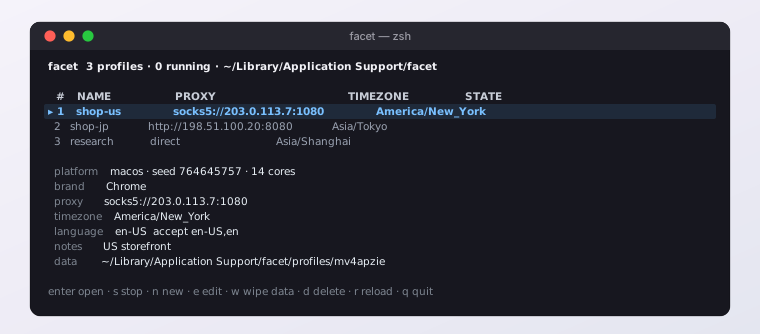
Running facet: three profiles, each with its own proxy and time zone, and the full fingerprint settings of the selected one.
The same identity after every restart
2/3
The seed is generated when a profile is created, written to profile.toml and never changed. Canvas, audio and fonts derive from it, and hardware concurrency is fixed at creation too, so a profile has the same fingerprint every time it opens, and no two profiles share one. The platform defaults to your own, so WebGL reports the real GPU. If you set a proxy but no time zone, facet warns you, because an exit IP that disagrees with the time zone is the most common giveaway.
Proxies with passwords, and no leak when they drop
3/3
Chromium cannot authenticate to a proxy on its own. When a proxy has a username, facet runs a local bridge listening only on 127.0.0.1 that authenticates upstream over HTTP, HTTPS or SOCKS5. A supervisor owns the bridge; if the supervisor exits, the bridge goes with it and the browser’s requests fail instead of leaving through your own IP. QUIC and non-proxied UDP are switched off too, so WebRTC has no side door.